



APIs are the backbone of modern web and mobile applications. They allow different software systems to communicate, exchange data, and perform actions behind the scenes. Because APIs handle important business logic and data, testing them properly is essential for building reliable applications.
In this complete guide to API Testing Strategies, we’ll cover the fundamentals of API testing, different testing approaches, commonly used tools, best practices, automation, and how AI is changing API testing in 2026.
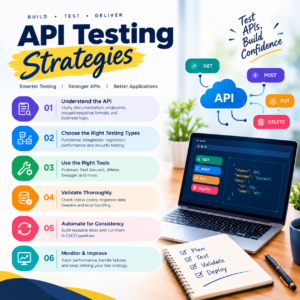
What Is API Testing?
API testing is the process of validating an application’s Application Programming Interfaces (APIs) to ensure they work correctly, securely, and reliably.
Unlike UI testing, API testing works directly with requests and responses.
For example, when a user logs into an application, the frontend may send an API request containing login credentials. The API processes the request and returns a response.
A tester can verify:
- HTTP status codes
- Response data
- Response time
- Authentication
- Authorization
- Headers
- Error handling
- Data validation
- Business logic
Understanding different API Testing Strategies helps QA professionals test these areas systematically.
Why Is API Testing Important?
APIs often contain critical business logic. A problem with an API can affect websites, mobile applications, dashboards, and other systems that depend on it.
Effective API testing can help identify:
- Incorrect responses
- Authentication problems
- Data inconsistencies
- Performance issues
- Security vulnerabilities
- Invalid input handling
- Integration problems
API testing can also be faster than testing through a graphical user interface because testers can interact directly with backend services.
Types of API Testing
A good API testing approach usually combines multiple testing types.
1. Functional API Testing
Functional testing verifies whether an API performs the expected operation.
For example, a product API should return the correct product information when a valid product ID is provided.
Test scenarios can include:
- Valid requests
- Invalid requests
- Required parameters
- Optional parameters
- Expected responses
- Error responses
2. Positive Testing
Positive testing checks whether the API works correctly when valid input is provided.
For example:
Request: Valid user credentials
Expected: Successful authentication response
3. Negative Testing
Negative testing checks how an API behaves when invalid or unexpected data is submitted.
Examples include:
- Missing parameters
- Invalid IDs
- Incorrect credentials
- Invalid data formats
- Unsupported HTTP methods
A reliable API should return appropriate errors instead of failing unexpectedly.
4. Regression Testing
Regression testing verifies that changes to an API haven’t broken existing functionality.
This is particularly useful for applications that are updated frequently.
Automation can make API regression testing faster and more consistent.
5. Performance Testing
Performance testing evaluates how an API behaves under different workloads.
Common areas include:
- Response time
- Throughput
- Concurrent requests
- Load handling
- Stability
Tools such as JMeter can be used for performance testing.
6. Security Testing
API security testing focuses on protecting data and preventing unauthorized access.
Testers may verify:
- Authentication
- Authorization
- Access controls
- Token validation
- Input validation
- Sensitive data exposure
Security testing should be performed carefully and within authorized environments.
Common API Testing Strategies
Now let’s look at practical API Testing Strategies that QA professionals can use.
Strategy 1: Validate Status Codes
HTTP status codes provide important information about API responses.
Common examples include:
- 200 – Successful request
- 201 – Resource created
- 400 – Bad request
- 401 – Unauthorized
- 403 – Forbidden
- 404 – Resource not found
- 500 – Server error
Don’t simply check whether the API returns a response. Verify whether the status code is appropriate for the scenario.
Strategy 2: Validate Response Body
The response body should contain the expected information.
For example, if an API retrieves customer information, verify:
- Customer ID
- Name
- Account status
- Required fields
You should also validate data types and important business rules.
Strategy 3: Validate Request Parameters
Check whether the API correctly handles:
- Required parameters
- Optional parameters
- Query parameters
- Path parameters
- Request body
- Headers
Test both valid and invalid combinations.
Strategy 4: Boundary Testing
Test values at and around the limits defined by the API.
For example, if a username allows a maximum of 50 characters, test:
- 49 characters
- 50 characters
- 51 characters
Boundary testing can reveal validation problems that normal test cases may miss.
Strategy 5: Authentication and Authorization Testing
Verify that users can access only the resources they are permitted to access.
Test scenarios such as:
- Valid credentials
- Invalid credentials
- Expired tokens
- Missing tokens
- Incorrect permissions
- Unauthorized resource access
Strategy 6: Schema Validation
API responses should follow the expected structure.
Schema validation can check:
- Required fields
- Data types
- Nested objects
- Arrays
- Field formats
This is especially useful for APIs used by multiple applications.
API Testing Tools
Several tools can help QA professionals implement effective API Testing Strategies.
Postman
Postman is widely used for manually testing APIs and creating automated collections.
It can be used for:
- Sending API requests
- Creating collections
- Environment variables
- Assertions
- Authentication
- Collection runs
Rest Assured
Rest Assured is a Java-based library commonly used for API automation.
It can help testers create automated API tests that integrate with existing Java testing frameworks.
Playwright
Playwright can also be used for API testing alongside browser automation, making it useful for teams that want to combine API and UI testing.
Cypress
Cypress provides API testing capabilities and can be useful for teams already using Cypress for web application testing.
API Testing Automation
Manual API testing is useful during development and exploratory testing, but automation becomes important when the same tests need to be executed repeatedly.
A typical API automation workflow looks like:
Request → Authentication → API Call → Response → Assertions → Report
Automated tests can verify:
- Status codes
- Response body
- Headers
- Schema
- Response time
- Business rules
API Testing in CI/CD
API tests can be integrated into CI/CD pipelines so that automated tests run whenever new code is introduced.
A typical workflow could be:
Developer Commit → Build → API Tests → Other Automated Tests → Report → Deployment
This helps teams identify problems earlier in the development process.
Tools commonly used in CI/CD workflows include:
- Git
- GitHub
- Jenkins
- GitHub Actions
API Testing Best Practices
Following good API Testing Strategies can make your testing process more reliable.
Use Clear Test Data
Create well-defined test data for positive, negative, and edge-case scenarios.
Test Different User Roles
If an application has multiple user types, verify permissions for each role.
Validate More Than Status Codes
A 200 response doesn’t necessarily mean the API is working correctly. Validate the response body, headers, structure, and business logic as well.
Automate Regression Tests
Automate repetitive tests that need to be executed frequently.
Keep Tests Independent
Where possible, individual tests should not depend unnecessarily on the result of another test.
Maintain Test Environments
Keep development, testing, and staging environments properly configured so that test results remain meaningful.
Document APIs Clearly
Good API documentation makes testing easier and helps developers and testers understand expected behavior.
AI in API Testing
Artificial Intelligence is becoming a useful productivity tool for QA professionals.
Tools such as ChatGPT and Google Gemini can assist with:
- Generating API test scenarios
- Creating sample JSON data
- Explaining API responses
- Suggesting negative test cases
- Generating automation code
- Analyzing error messages
- Creating test documentation
AI-generated tests should still be reviewed by experienced testers because business requirements and application-specific behavior require human validation.
API Testing Roadmap for Beginners
If you’re new to API testing, follow this learning path:
Step 1: Learn HTTP Basics
Understand:
- HTTP methods
- Status codes
- Headers
- Cookies
- Request and response
Step 2: Learn REST APIs
Understand resources, endpoints, parameters, JSON, and authentication.
Step 3: Learn Postman
Practice creating requests and validating responses.
Step 4: Learn API Test Automation
Choose a programming language and automation framework.
For example:
Java → Rest Assured → TestNG → Maven
or explore API testing with modern JavaScript/TypeScript tools.
Step 5: Learn CI/CD
Understand how API tests can run automatically within a software delivery pipeline.
API Testing Interview Preparation
If you’re preparing for a QA interview, make sure you understand questions such as:
- What is API testing?
- What is REST API?
- What are HTTP methods?
- What is the difference between PUT and PATCH?
- What are HTTP status codes?
- How do you test authentication?
- What is API automation?
- How do you validate JSON responses?
- How do you test negative scenarios?
- How can API tests be integrated into CI/CD?
Practical knowledge is generally more useful than memorizing definitions alone.
Frequently Asked Questions
Is API testing difficult for beginners?
The fundamentals can be learned gradually. Start with HTTP, REST, JSON, and Postman before moving into automation.
Is coding required for API testing?
Manual API testing with tools such as Postman can be performed with limited coding. Programming becomes more important when building automated API test suites.
Which tool is best for API testing?
Different tools serve different purposes. Postman is commonly used for API exploration and testing, while programming libraries such as Rest Assured can be useful for automated API testing.
Can API testing be automated?
Yes. API automation can validate requests, responses, schemas, authentication, and business rules repeatedly.
Is API testing important for automation testers?
Yes. Modern applications often rely heavily on APIs, so API testing can be an important skill for QA automation professionals.
Final Thoughts
Effective API Testing Strategies go beyond simply sending requests and checking status codes. A strong approach combines functional testing, negative testing, validation, authentication checks, regression testing, performance considerations, and automation.
For QA professionals in 2026, API testing is an important skill to combine with manual testing, automation, CI/CD, and AI-assisted testing.
Start with HTTP fundamentals and Postman, practice real-world API scenarios, and gradually move toward automation. This structured approach can help you build practical API testing skills and prepare for modern QA roles.